Monday, November 18, 2013

Display or List Environment Variables in Windows

Environment variables are a set of dynamic named values that can affect the way running processes will behave on a computer.
They are part of the operating environment in which a process runs. For example, a running process can query the value of the TEMP environment variable to discover a suitable location to store temporary files, or the HOME or USERPROFILE variable to find the directory structure owned by the user running the process.

To view the contents of the environment variables:

1. open command prompt (write "cmd" in search bar of the start menu or in Run)
2. To list -> write "set" (without quotes) and hit enter
    To save it into file -> "set > output.txt" and hit enter
I.e. The file will be saved in C:\
To save the file in other directory "set > D:\output.txt" and hit enter


Tuesday, November 12, 2013

Java Decompiler project: To extract .java file from .class

Please check out the following project which also contains plugins for Eclipse and IntelliJ at http://jd.benow.ca/
The “Java Decompiler project” aims to develop tools in order to decompile and analyze Java 5 “byte code” and the later versions.
It can extract .java files from .class files which are called "byte codes" in Java. 
Thanks for the developers!


Thursday, November 7, 2013

Simple way to solve MySql Error #1044 - Access denied for user 'username'@'localhost' to database 'my_database'

Error Description:

Access denied for user 'username'@'localhost' to database 'my_database' means: 
the user 'username' doesnot have enough or no privilege to access (insert, update, create, drop/delete) the database 'my_database'.

Simple Solution:

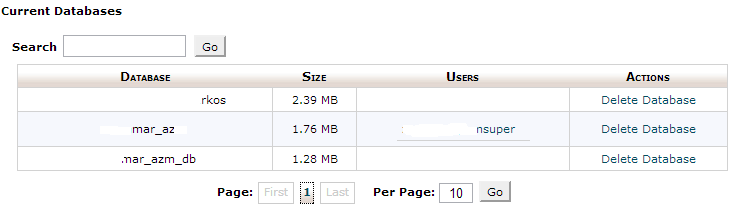
1. Create the database in cPanel
2. DONOT assign a user [Main thing]


3. Use phpMyAdmin -> Select the database you want to import the tables -> Go to Import tab and browse for the file -> Click "Go"

4. You will see "Import has been successfully finished ..." message.

Wednesday, October 16, 2013

Formatting Numbers by padding with leading zeros in SQL Server

DECLARE @empNumber INT = 7123
SELECT STUFF('000000', 6-LEN(@empNumber)+1, LEN(@empNumber), @empNumber)
Or, as per your query

SELECT STUFF('000000', 6-LEN(EmployeeID)+1, LEN(EmployeeID), EmployeeID)
         AS EmployeeCode
FROM dbo.RequestItems
WHERE ID=0

You can change your procedure in this way

SELECT Right('000000' + CONVERT(NVARCHAR, EmployeeID), 6) AS EmpIDText,
       EmployeeID
FROM dbo.RequestItems
WHERE ID=0
However this will change your EmployeeID to a string, so I suggest to add again the original numeric value

Friday, September 13, 2013

How to Display Date and Time in your Grails Application

I am going to show you how you can accept Data and Time from the user as input using 'Jquery Date Time Picker Plugin'.

You can read more about the plugin here.

Step 1:

In BuildConfig.groovy, add the following code in plugins tag as:

plugins { 
    compile ":jquery-ui:1.8.24" 
    compile ':jquery-date-time-picker:0.1.0'
}

Step 2:

In Config.groovy, add the following code:

Monday, September 9, 2013

DiffMerge : A Merging tool for Git

When using the distributed Version Control i.e. Git, your files might conflict since multiple users might have been working on same file.

Hence, you can use any text editor which is boring, tiresome and hard to identify where the issue is. The best option is to use a merging tool such as Diff Merge. (Click on the link to go to the downloads page)

I faced one configuration issue when I was trying to use it for the first time.
The error was "Unexpected Parameter". The configuration from the software manual didnot work for me.

The solution is to edit the .gitconfig file manually to look like the following.

The following commands in a Command Prompt window will update your .gitconfig to configure GIT use DiffMerge:

C:\> git config --global diff.tool diffmerge
C:\> git config --global difftool.diffmerge.cmd "C:/Program Files/SourceGear/Common/DiffMerge/sgdm.exe \"$LOCAL\" \"$REMOTE\""

C:\> git config --global merge.tool diffmerge
C:\> git config --global mergetool.diffmerge.trustExitCode true
C:\> git config --global mergetool.diffmerge.cmd "C:/Program Files/SourceGear/Common/DiffMerge/sgdm.exe  --merge --result=$MERGED $LOCAL $BASE $REMOTE" trustExitCode = true keepBackup = false


The code snippet that is Bold is the major change made.

Grails : Displaying Error Message on View which is thrown from the Service Layer

In your controller class, enclose the code that calls the service in a try-catch block.

Example:
try {

def searchResult = User.getUserByName(params.name)

if(searchResult != null)
render(view: "/admin/user/list", model: [userInstanceList: searchResult?.results, userInstanceTotal: searchResult?.total])

else{

flash.message = message(code: 'user.nonfound.message', default: "No items found.")
render(view: "/admin/user/list", model: [userInstanceList: [], userInstanceTotal: 0])
}
} catch (e) {

flash.message = message(code: 'user.nonfound.message', default: "No items found.")

render(view: "/admin/user/list", model: [userInstanceList: [],userInstanceTotal: 0])
}