Showing posts with label Windows Tips. Show all posts

Thursday, June 5, 2014

Run Windows Command prompt (CMD) in Full screen mode

I got this values for running Windows CMD in full screen mode. Width=237, Height=82

Open CMD, Right click on the title bar and select Properties and set this values.

For more info, read this.

Tuesday, February 4, 2014

How to remove empty or blank lines in Microsoft Word document

If multiple line blank spaces appear in your Microsoft Word document, (when you copy and paste from a PDF document or from some website), 

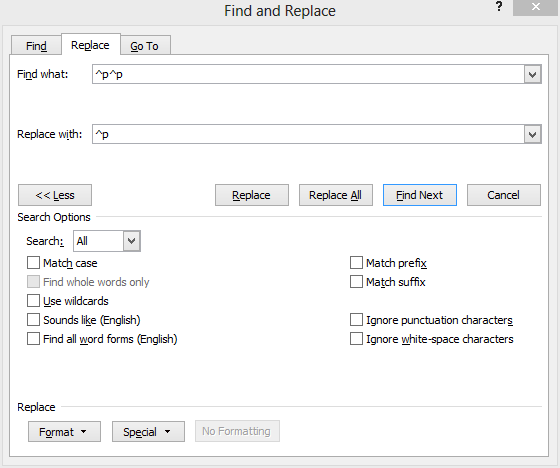
  1. Press Ctrl + F in the document
  2. Go to the Replace tab
  3. Replace double paragraph mark (i.e. ^p^p) through a single one (^p).
  4. Press 'Replace All'


Thursday, January 16, 2014

Why would an engineer want to work at Google instead of Facebook?

As an engineer who worked at both:


  • Personally, I believe that Google works on bigger and more important ideas/projects than Facebook. I think it can have more positive impact on humanity in general.
  • Google's engineering culture is not "move fast and break things": things get done more slowly but in general designed, coded and tested much cleaner/better. This might fit well to some people better.
  • At Facebook, you typically write PHP. At Google, you typically write any of Java/JS/Python/C++. These are more widespread (and in my opinion, better) languages than PHP.
  • Google has more restaurants than Facebook : )
  • Breadth of product line is much bigger at Google.
  • Google has a much better research department. In fact, Facebook doesn't have one.
  • Google has much more learning opportunities (a lot of courses, codelabs, much better documentation and stricter code review)

Source: http://www.quora.com/

Monday, November 18, 2013

Display or List Environment Variables in Windows

Environment variables are a set of dynamic named values that can affect the way running processes will behave on a computer.
They are part of the operating environment in which a process runs. For example, a running process can query the value of the TEMP environment variable to discover a suitable location to store temporary files, or the HOME or USERPROFILE variable to find the directory structure owned by the user running the process.

To view the contents of the environment variables:

1. open command prompt (write "cmd" in search bar of the start menu or in Run)
2. To list -> write "set" (without quotes) and hit enter
    To save it into file -> "set > output.txt" and hit enter
I.e. The file will be saved in C:\
To save the file in other directory "set > D:\output.txt" and hit enter


Wednesday, July 17, 2013

Change gitbash home directory

The simplest way is to change the property of the git bash.
Right click on Git Bash -> Properties
Change the "Start in" attribute to "%HOMEDRIVE%%HOMEPATH%\git" (without quotes) as shown in the figure below.

Tuesday, July 16, 2013

Windows 8 - Cannot Save on 'Hosts'

Article by http://www.petenetlive.com/KB/Article/0000674.htm

Problem

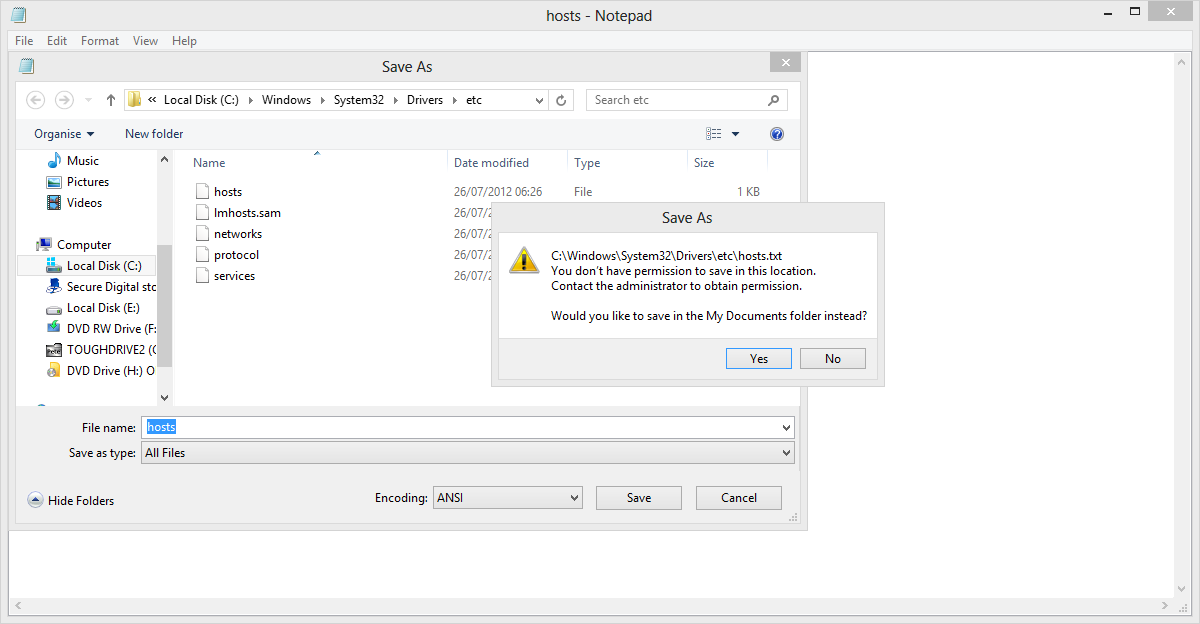
Windows did this with Windows 7 (and Vista). If you attempt to edit the hosts file you will see the following.
Hosts - You don't have permission
You don't have permission to save in this location. Contact the administrator to obtain permission. Would you like to save in the My Documents folder instead?

Solution

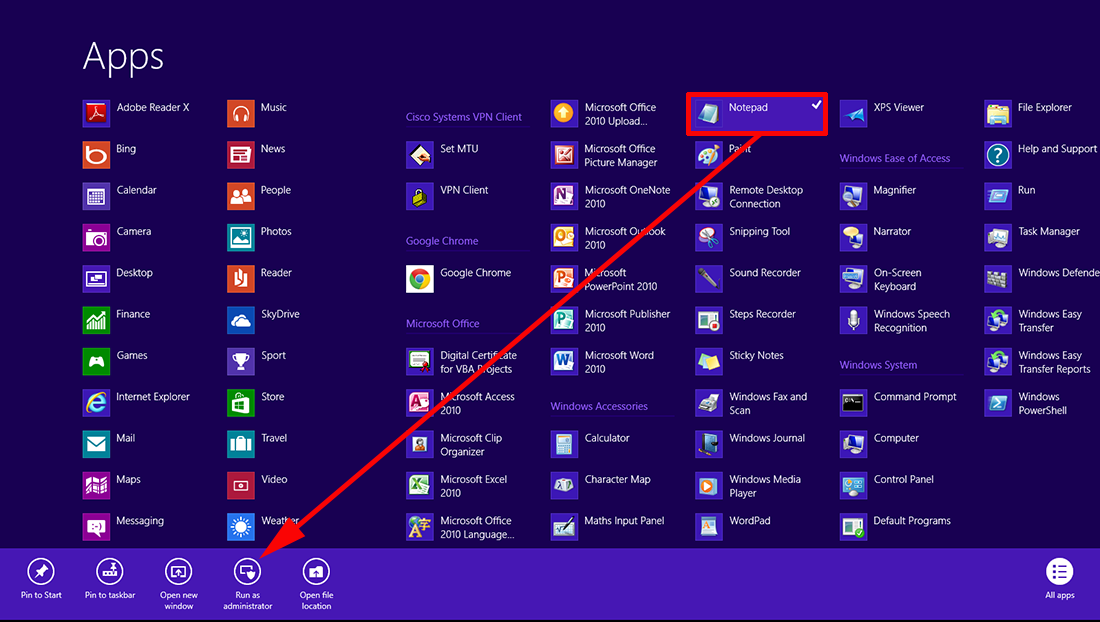
1. You could run an admin command window, and use the EDIT command, but Notepad is easier. Open the Apps page (Windows Key+Q) > Locate Notepad and right click it > Run as Administrator.
Note: YES Even if you are logged in as an administrator.

Windows 8 Run Notepad as Administrator

2. Now you can open the hosts file (make sure you change the file type to all files or notepad wont see it!). And you can then edit the file and save the changes.

Windows 8 Save the hosts file

Making VMware Server 2 work on Windows 8

Follow the following steps:

  1. Install VMware server
  2. Open regedit and look for this address
    1. HKEY_LOCAL_MACHINE\SYSTEM\ControlSet001\Services\VMwareHostd\DependOnServiceand Remove "ProtectedStorage" from the list.
  3. Open CMD and write the followingsc create "VMware Host Agent" start=auto binPath="C:\Program Files (x86)\VMware\VMware Server\vmware-hostd.exe"
  4. Restart your computer
  5. Start the VMware by double clicking on the icon on the desktop "VMware Server Home Page"
  6. Log in. If you are not able to log in, use your "administrator" user's name and password. For more info, read this (http://helpdeskgeek.com/virtualization/vmware-server-web-access-default-username-and-password/)
  7. If you already have a VM installed and moved from another computer,
    1. Click on "Add Virtual Machine to Inventory"
    2. Browse and Select the .vmx file
    3. When it prompts you "msg.uuid.altered:This virtual machine may have been moved or copied. In order to configure certain management and networking features VMware Server needs to know which. Did you move this virtual machine, or did you copy it? If you don't know, answer "I copied it"." 
select "I Moved It" and click "OK"

8. If such error comes 
"Power On Virtual Machine" failed to complete.
If these problems persist, please contact your system administrator.
Details: Cannot open the disk 'C:\Virtual Machines\Windows 2003-002\Windows 2003-002.vmdk' or one of the snapshot disks it depends on.

Solution

Reason: Failed to lock the file.", delete the .lck file from the VM's folder. These files are the lock files that should only exist while your VM is powered on. Delete the .lck files and power the VM up.